توضیحات
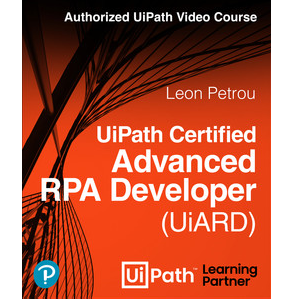
دوره UiPath Certified Advanced RPA Developer (UiARD) Authorized UiPath Course (Video). این دوره ویدئویی 5 ساعته، راهنمای کامل شما برای خودآموزی و قبولی در آزمون UiPath Advanced RPA Developer است. با تبدیل شدن به یک متخصص UiPath Certified، پیشرو در آینده کار باشید. مهارتهای مورد تقاضا را برای نقشهای Advanced RPA Developer، Solution Architect، RPA Architect و موارد دیگر کسب کنید. با گذراندن این دوره، شما به عنوان یک توسعه دهنده RPA پیشرفته، مهارت ها و دانش لازم را برای طراحی، توسعه و استقرار راه حل های RPA پیچیده و در سطح تولید خواهید داشت.
مزایای گذراندن این دوره:
- تبدیل شدن به یک متخصص UiPath Certified Advanced RPA Developer
- کسب مهارت های مورد تقاضا در صنعت RPA
- افزایش قابلیت های شغلی و پتانسیل درآمد
- تبدیل شدن به یک رهبر در اتوماسیون فرآیند رباتیک
- کمک به سازمان خود در ارتقای کارایی و بهره وری
آنچه فرا خواهید گرفت:
- آماده شدن برای قبولی در آزمون UiPath Certified RPA Associate
- ارتقای مهارت های خود به عنوان یک توسعه دهنده RPA و آماده شدن برای آزمون UiPath Advanced RPA Developer (UiARD)
- تسلط بر چارچوب Robotic Enterprise (RE) برای ساخت اتوماسیون های قدرتمند و مقیاس بزرگ
- طراحی و توسعه راه حل های RPA پیچیده و در سطح تولید
- توسعه پروژه های RPA سر تا سر
- ساخت و هدایت اتوماسیون های در سطح تولید با استفاده از چارچوب Robotic Enterprise (RE)
این دوره مناسب افرادیست که:
- توسعه دهندگان RPA
- نقش هایی که به تخصص توسعه دهنده RPA مانند RPA Architects، طراحان راه حل، مهندسین RPA، معماران راه حل، معماران اتوماسیون فرآیند نیاز دارند
مشخصات دوره UiPath Certified Advanced RPA Developer (UiARD) Authorized UiPath Course (Video)
- ناشر: Pearsonitcertification
- مدرس: Leon Petrou
- سطح آموزش: مبتدی تا پیشرفته
- مدت زمان آموزش: 4 ساعت و 57 دقیقه
سرفصل های دوره
Introduction
Lesson 1: Exam Overview
1.1 Install UiPath Studio Academic Alliance
1.2 Purpose of UiARD Certification
1.3 What you will get
1.4 Where you can take the exam
1.5 Paying for the exam
1.6 More exam details
1.7 Review the exam description document
1.8 Studying advice
Lesson 2: UiPath Studio – Activities
2.1 Use arguments to pass data
2.2 Extract Structured Data
2.3 Build a data table
2.4 Filter data tables
2.5 Merge data tables
2.6 Send mail
2.7 Read mail
Lesson 3: UiPath Studio – Properties
3.1 Understand the Continue on Error property
3.2 Understand the Timeout property
3.3 Understand the WaitForReady property
3.4 Perform activities on element appear
3.5 Understand the private property
Lesson 4: Robotic Enterprise (RE) Framework
4.1 Understand the RE FrameWork States
4.2 Use dispatcher and performer bots
4.3 Understand states and their functions
4.4 Set a transaction status
4.5 Understand the difference between system and business exceptions
4.6 Understand the sequence of activities in a System Exception
4.7 Use Excel in UiPath
4.8 Use the configuration file
4.9 Understand state machines
4.10 Set up tabular and non-queue RE Framework
Lesson 5: Classic Selectors
5.1 Describe tags and attributes
5.2 Use wildcards and their types
5.3 Create dynamic selectors
5.4 Tweak and finetune selectors
5.5 Learn selector best practices
5.6 Understand the difference between full vs partial selectors
5.7 Use Default, Active Accessibility, or UI Automation frameworks
Lesson 6: .NET Classes and Objects
6.1 Understand .Net terminology
6.2 Use the split method
6.3 Use the format method
6.4 Use the select method
6.5 Invoke methods and code
6.6 Initialize and use dictionaries
6.7 Get values from Data Tables
6.8 Use Regular Expressions (RegEx)
6.9 Understand objects and generic values
6.10 Use generic value calculations
Lesson 7: Advanced Functions
7.1 Validate the file and project
7.2 Use the Workflow Analyzer and UiPath best practices
7.3 Nest if activities
7.4 Use and convert secure strings
7.5 Reuse code and components
7.6 Create a library
7.7 Use source control and GIT
Lesson 8: Error Handling and Troubleshooting
8.1 Handle exceptions using Try Catch
8.2 Handle exceptions using ContinueOnError
8.3 Create exceptions using Throw
8.4 Use the Global Exception Handler
8.5 Use retry scope
8.6 Debug workflows using the debugger
8.7 Use breakpoints with Invoke Workflow File
8.8 Build background automations
Lesson 9: Advanced Orchestrator Functions
9.1 Use assets
9.2 Run orchestrator jobs
9.3 Use Add Queue Item
9.4 Understand unique references
9.5 Prioritize queue items
Summary
پیشنیازهای دوره UiPath Certified Advanced RPA Developer (UiARD) Authorized UiPath Course (Video)
- Preferably completed formal or informal UiPath training with hands-on experience.
تصاویر دوره

نمونه فیلم دوره
راهنمای نصب
پس از Extract، با Player دلخواه خود مشاهده کنید.
زیرنویس: ندارد
کیفیت: 720p
لینک دانلود
گذرواژه فایل(ها): www.downloadly.ir
حجم فایل
927 مگابایت